 DocuGhost
Write and format
On this page
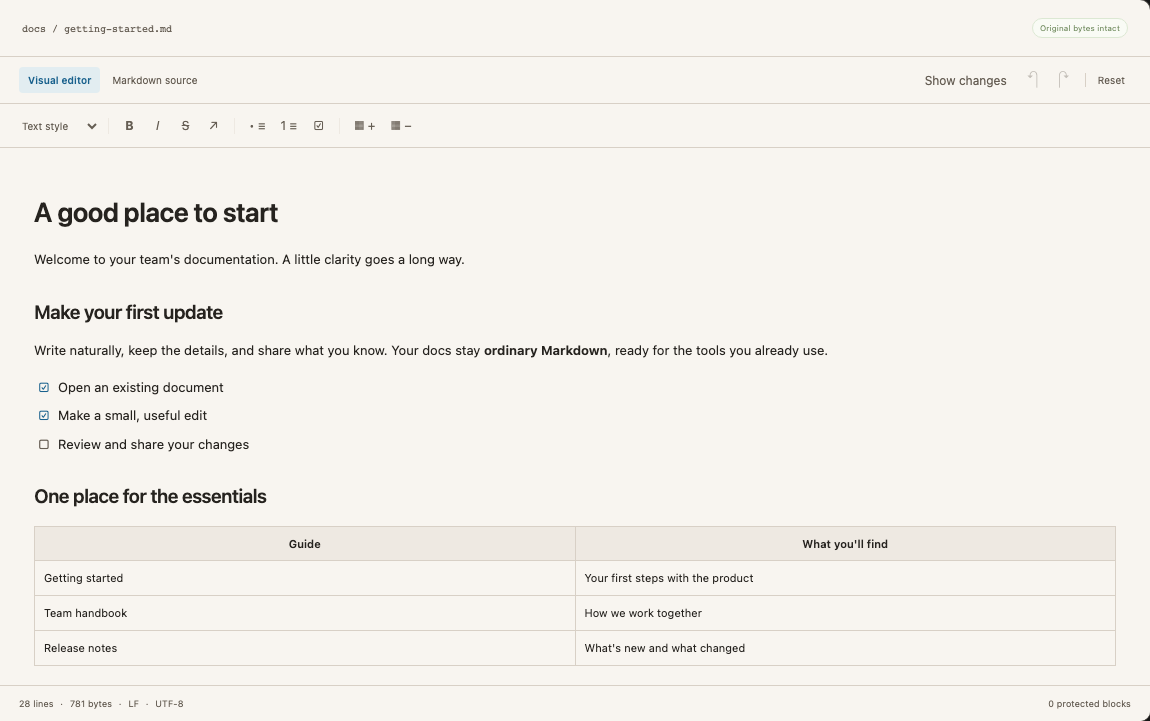
Use Visual editor for everyday writing and Markdown source when you need direct control over the file.
Choose your layout
The changes panel is optional. Show changes opens it; Hide changes closes it and gives the editor more room. Closing the panel does not change your document, its undo history, or the final GitHub review.
Use the color menu in the top bar to choose Orange, Pink or Light blue accents. Theme and panel preferences are remembered in this browser, including when you reopen the editor. Your Markdown is unaffected.
Type Markdown shortcuts
At the start of a paragraph, type a marker and press Space:
| Type | Creates |
|---|---|
# to ###### | Heading levels 1–6 |
-, + or * | Bullet list |
1. | Numbered list |
> | Blockquote |
[] or [ ] | Unchecked task |
[x] | Checked task |
For a fenced code block, type three backticks and an optional language, then press Space or Enter. You can also start an existing bullet item with [ ] or [x]. Add text to an empty task for it to render consistently on GitHub.
Inline shortcuts convert when you type the closing marker: **bold**, *italic*, ~~strike~~, inline code in backticks, and [link text](https://example.com). Shortcuts do not run inside code. Use Undo to reverse a conversion.
Format existing text
Select text and use the toolbar for bold, italic, strikethrough or a link. Use Text style to change the paragraph or heading style. You can use Command+B / Ctrl+B and Command+I / Ctrl+I for bold and italic.
Press Enter to continue a paragraph or list. A heading conversion that does not fit its current list container may stay literal. If an edit is blocked, its explanation offers source mode instead.
Edit tables and code
Click inside a table cell to edit its text. Tab moves between cells; use the row controls to add or remove a row. A cell edit aims to preserve the rest of the table’s original spacing. Structural table changes can rewrite the table region.
Edit fenced code directly in its code block. DocuGhost does not run a code formatter over the contents. Existing fence style and unrelated code stay in place where the edit can be patched safely.
Use source mode
Markdown source opens the full document in CodeMirror. Use it for frontmatter, HTML, custom syntax, or a structure the visual editor cannot change safely. Existing line endings are retained; inserted lines use the surrounding style.
Switching modes does not commit anything to GitHub. Undo and Redo retain exact source checkpoints across both modes. See Review and save for the final step.