 DocuGhost
Review and save
On this page
Writing, saving a draft and submitting to GitHub are separate steps. You stay in control of the last one.
Show changes when you need them
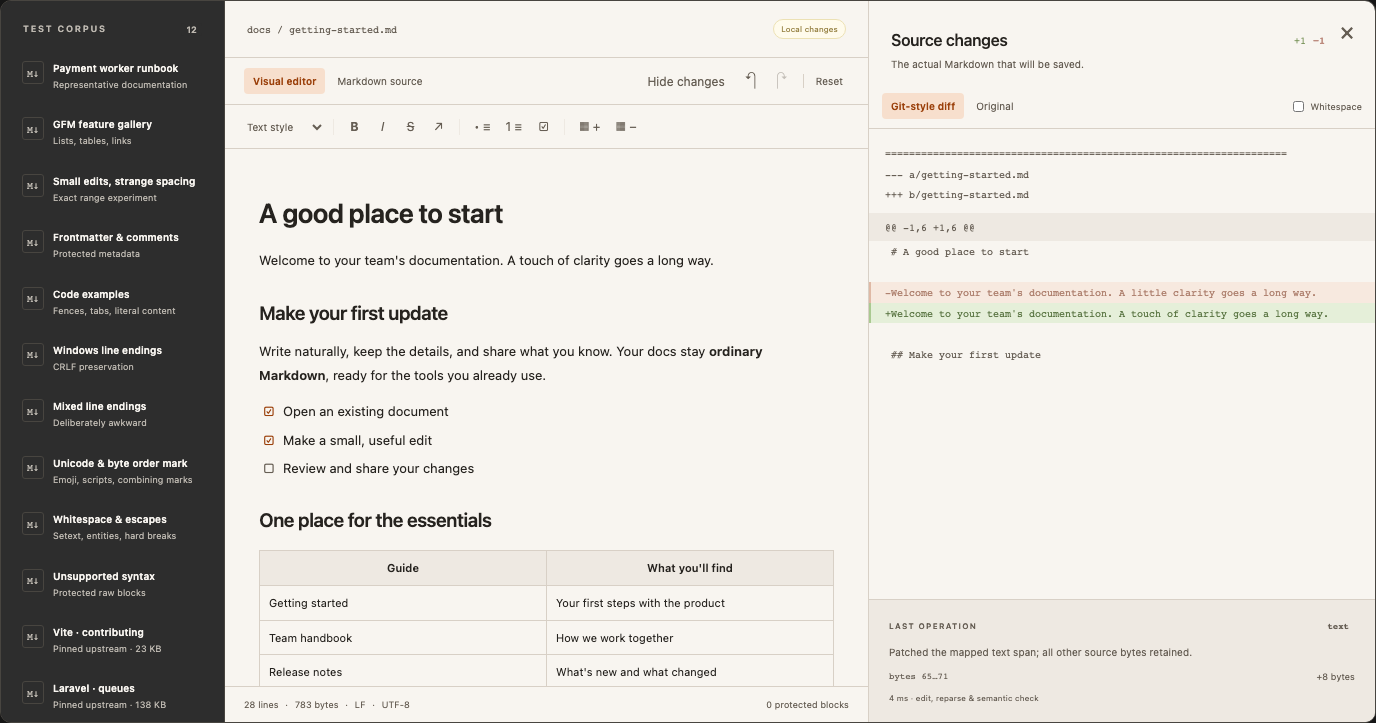
Click Show changes above the editor to open the source panel. Git-style diff shows removed and added lines; Original shows what you opened. Turn on Whitespace to make spaces and line endings easier to inspect.
Click Hide changes or the panel’s close button when you want more writing room. This preference is remembered in your browser. It does not remove GitHub’s review step or change the saved Markdown.
Save a local file
In the browser demo, Save a copy downloads the current Markdown. Files live in tab memory, so download before leaving. Opening and immediately saving an unchanged supported UTF-8 file should produce identical bytes.
Submit a repository draft
In the local GitHub workspace, wait for the draft’s saved status, then choose Review changes. Inspect the included files, source diff and new images. Enter the submission details shown in the dialog.
Choose a pull request to send the change for review on GitHub. Direct commits are available only if enabled on the connection. Both actions write to GitHub only after you submit.
GitHub’s diff is line-based: replacing one word still displays a removed line and an added line. That does not mean the rest of the document was rewritten.
What preservation means
DocuGhost retains the source and applies small edits to mapped source ranges. It does not routinely serialize the entire document after each visual edit.
| Content | Expected behavior |
|---|---|
| Normal paragraph or table-cell text | Change the relevant source range; leave unrelated bytes alone. |
| Existing whitespace, Unicode and line endings | Retain them outside the changed region. UTF-8 files, including a byte order mark, are supported. |
| Fenced code | Edit the contents without running a formatter over them. |
| Unchanged YAML, HTML and unknown syntax | Preserve it verbatim; protected blocks require source mode to edit. |
| Structural changes | Regenerate the smallest supported region, which may change formatting within it. |
| Ambiguous or unsupported visual edit | Block it with an explanation rather than silently rewrite the file. |
Exact preservation of every character inside an edited region is not promised. Changing a list’s structure, table shape, delimiter or other Markdown construct may need more than a text patch. Custom MDX components, directives and unusual nesting are not fully editable visually. Review a representative document from your own repository before relying on a workflow.
After submitting
Open the resulting PR or commit on GitHub and inspect it there. PR merge and close status are not automatically synchronized yet. After merging, refresh the repository and reopen the file to load its latest version. Avoid overlapping edits to the same document while an earlier PR is still open.
If submission is interrupted or the repository changed, keep your draft and use the recovery guide. Do not start a new submission while the first result is unknown.